Wednesday, August 31, 2011

Yay, my LO made the Cricut Chirp!

I'm so excited, one of my projects was featured on the Cricut Chirp!  The Cricut Chirp is a weekly online newsletter featuring projects using any of the Cricut machines.  

Last night I checked my email and while reading the Cricut Chirp newsletter, there it was, one of my projects made the Chirp.  I just couldn't believe it, so it took me a moment to realize it was my project, ha ha ha. My featured project was the First Day of School LO I made for the Cricut 360 Challenge No. 8.  More details about this LO can be found here. 
I feel so happy and honored, so I wanted to share the good news with my followers.  If you want to check out the rest of the amazing projects featured this week, you can find the Cricut Chirp HERE.  Thanks for stopping by!

Friday, August 26, 2011

Cricut 360 Challenge No. 9

Hello! Labor Day weekend is just around the corner which means we all get a chance to RELAX! This week at Cricut 360 the challenge is to create a card or layout with that in mind. The only requirement is to use any of the Cricut Cartridges.  For more details about this week's challenge, please visit the Cricut 360.

For this week's challenge I created a card using the very cute penguin from the Create a Critter cartridge.  The Just Chillin' sentiment is also from the Create a Critter cartridge.  Hope you like it!

Tools:
  • Cricut Expression
  • Create a Critter Cricut Cartridge
  • Crop-a-dile
  • Cuttlebug Spots and Dots Embossing folder
Materials:
  • Paper Source Chocolatechip cardstock
  • GP white cardstock
  • Lime Green Twine
  • Metallic eyelets
  • SU! Designers Series Play Date paper pack
  • Orange cardstock (Joanns)
  • SU! Sweet Pea Designer Series Paper Stack (retired)
  • SU! Expresso marker

Friday, August 19, 2011

Cricut 360 Challenge No.8

Hello, today at Cricut 360 there is a new challenge!! School starts soon, so this week's Cricut 360 challenge is to create card or layout with that in mind using any Cricut Cartridge(s).  


This is my take for this week's challenge.  I created a 3-photo layout.  I used the Robotz Cricut cartridge for the title (can you tell the font is one of my favorite?), the Doodlecharms Cricut cartridge and Design Studio software for the apple border. 


If you would like to participate in this challenge or to check out amazing samples created by the Cricut 360 design team, please go HERE.


Thanks for stopping by!


Tools:
  • Cricut Expression
  • Cricut Robotz cartridge
  • Cricut Doodlecharms cartridge
  • Cricut Design Studio software
  • Crop-a-dile
  • White Signo gel pen
Materials:
  • Light blue Bazzil cardstock
  • Red Bazzil cardstock
  • 12X12 DCWV The Grade School cardstock stack
  • Yellow twine
  • SU! brads
  • SU! Whisper White cardstock
  • Black cardstock from Joanns
  • SU! dimensionals

Friday, August 12, 2011

Cricut 360 Challenge No. 7

Hello, this week's challenge at Cricut 360 is to create some Old West type of card or layout using any of the Cricut cartridges.  For more details about this week's challenge at Cricut 360 and to link your creations, please go HERE.  


Last year my son's B-day party theme was Toy Story and since I hadn't had a chance to scrap all the pictures I took that day, I found this challenge to be the perfect time to start. I created this two page layout using Jessie and Woody cuts from the Cricut Toy Story cartridge.


Tools:

  • Cricut Expression
  • Cricut Toy Story cartridge
  • Cricut Designer's Calendar cartridge
  • Brother Sewing machine
  • Crop-a-dile
  • Cuttlebug
  • Swiss Dots Cuttlebug embossing folder
  • Sketch Copic Markers
Materials: 
  • SU! So Saffron cardstock
  • Blue, red, yellow, white, black, and brown cardtock from Joann's open stock
  • SU! Designers Series Play Date paper pack
  • SU! Blush Blossom cardstock (retired)
  • SU! large brads (retired)
  • SU! Hemp twine
  • 12x12 kraft cardstock from Joanns
Don't forget to check out the amazing creations from the rest of the design team and I really hope you can join us this week!!

Saturday, August 6, 2011

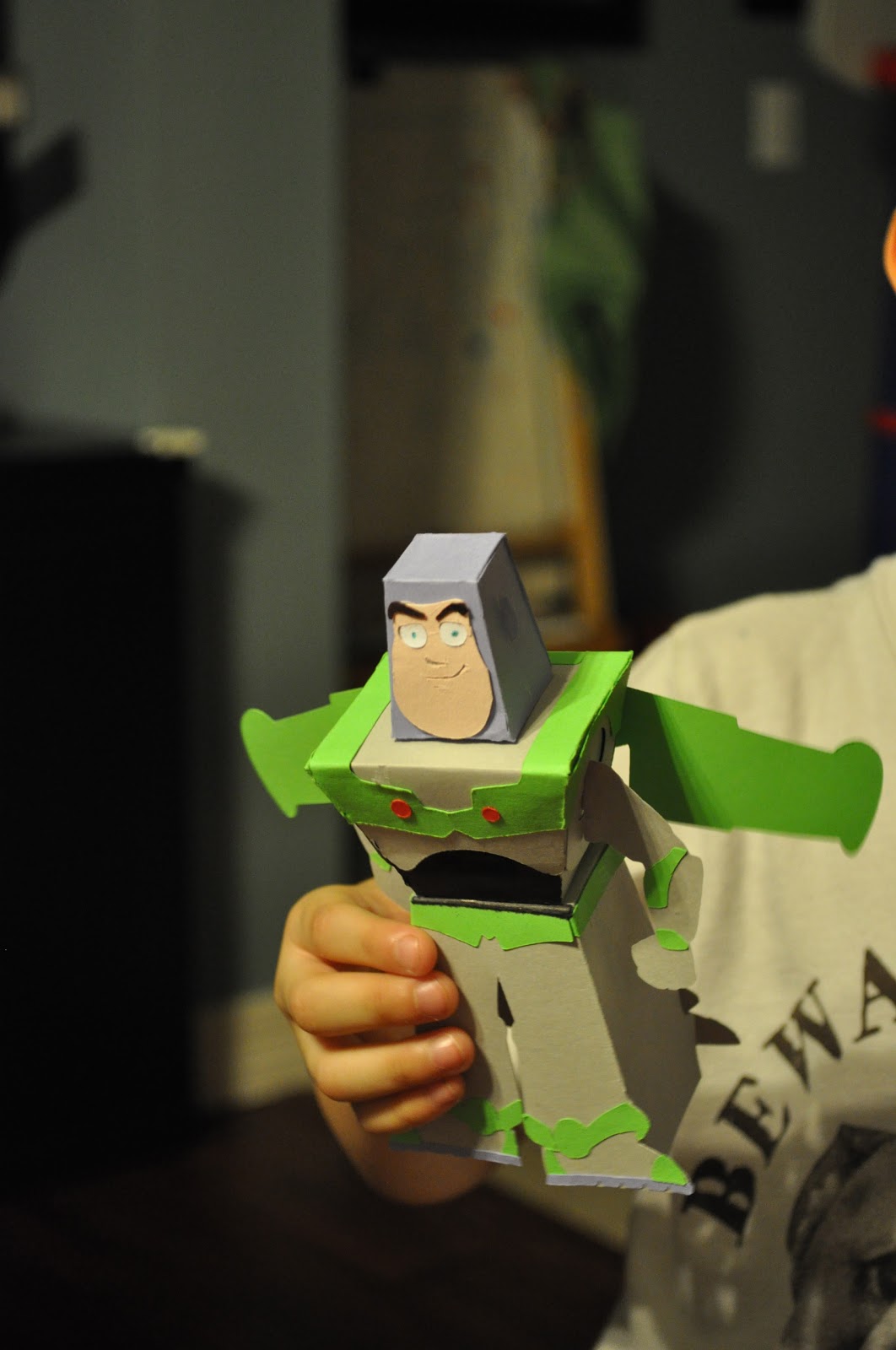
Buzz Lightyear in 3D

Hello my friends, The heat is unbearable here in North Texas, so we spend most of the time indoors and need to find ways to keep ourselves occupied.  So, I just wanted to make a quick post about the wonderful project my little son and I worked this afternoon.  My little one chose to play with HIS Cricut (yes, he thinks it's his toy) and he chose to make something from the Toy Story cartridge.  He picked the 3D Buzz Lightyear.  We used Provo Craft Design Studio software and a 24x12 mat.  My son picked the colors and I thing he did an amazing job since they are very close, don't you think?


I have to say it was not an easy task (it took us about 2.5 hrs to complete it) putting it together but with the help of my husband we completed it and it looked amazing.  More importantly, my son loved it!! Thanks for stopping by.


Tools:

  • Cricut Expression
  • Toy Story Cartridge
  • Glue pen
  • Spatula
  • Tweezers (life savers!!)
  • Patience, patience and more patience, hahahaha.
Materials:

  • Assorted cardstock from Joann's open stock
  • SU! Blossom Blush cardstock (retired, sadly)
  • Light blue marker (for the eyes)